AI in Action: Using ChatGPT for Video Content Creation
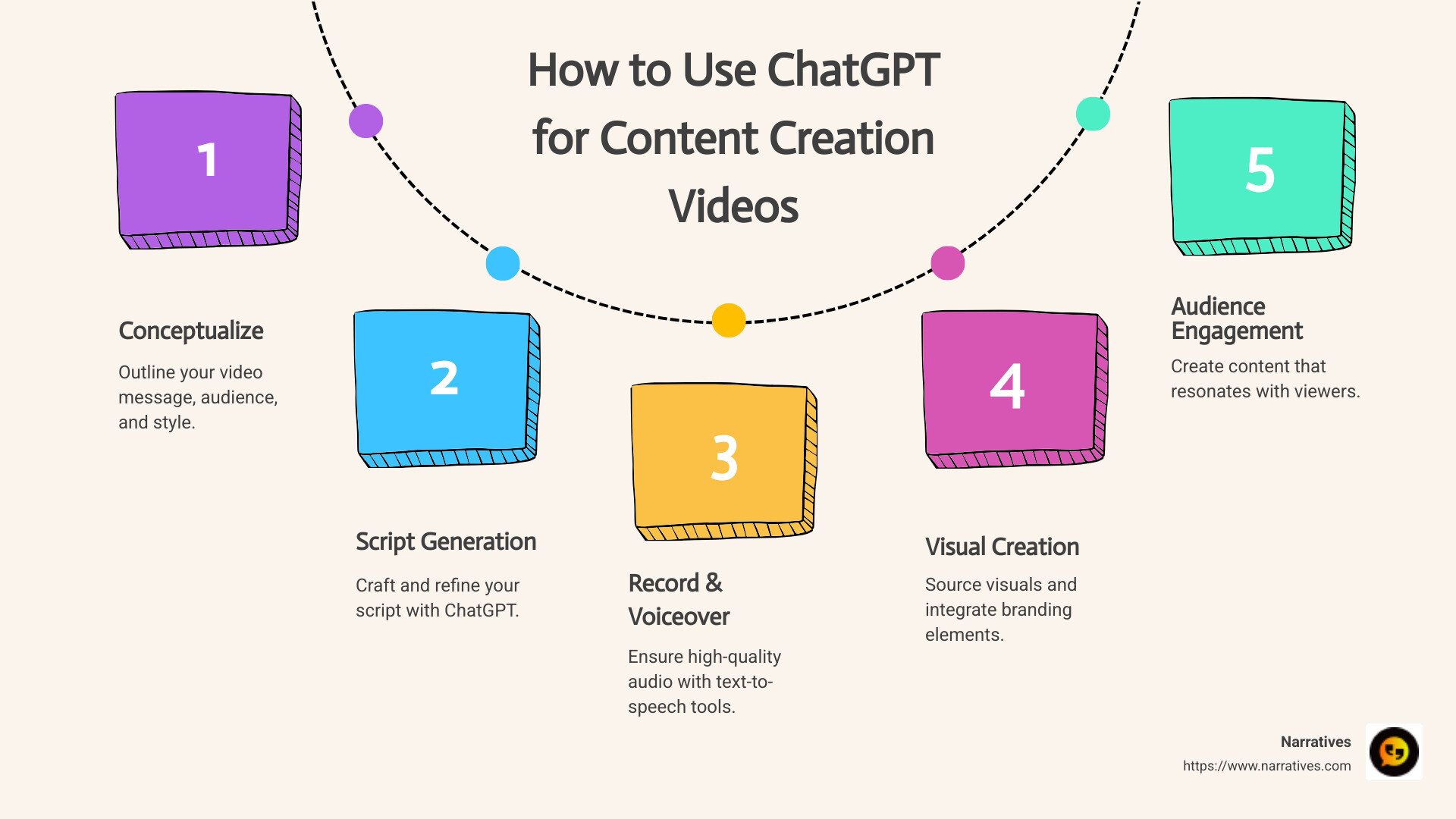
If you're searching for how to use chatgpt for content creation videos, here’s a quick overview to get you started:
- Conceptualize Your Video: Determine the core message, know your audience, and choose the right style.
- Generate the Script: Use ChatGPT to craft and refine your video script through effective prompt writing.
- Record and Edit: Use quality voiceover and video editing techniques.
- Engage Your Audience: Make sure your video content resonates with your viewers.
When content is king, standing out can be tough. This is especially true for non-profits and social impact organizations that aim to tell powerful stories. Enter ChatGPT, a tool that simplifies video creation and helps amplify your mission through compelling storytelling. By integrating ChatGPT into your video content process, you gain a collaborative partner that helps you not only craft a gripping script but also guide you through the entire video creation journey. Imagine translating your impactful message into a polished video that not only reaches but also resonates with your audience.
Whether you're a non-profit with limited resources or a brand focused on advocacy, with ChatGPT, creating content that touches hearts and spurs action is more accessible than ever.
Quick how to use chatgpt for content creation videos terms:
How to Use ChatGPT for Content Creation Videos
Conceptualizing Your Video
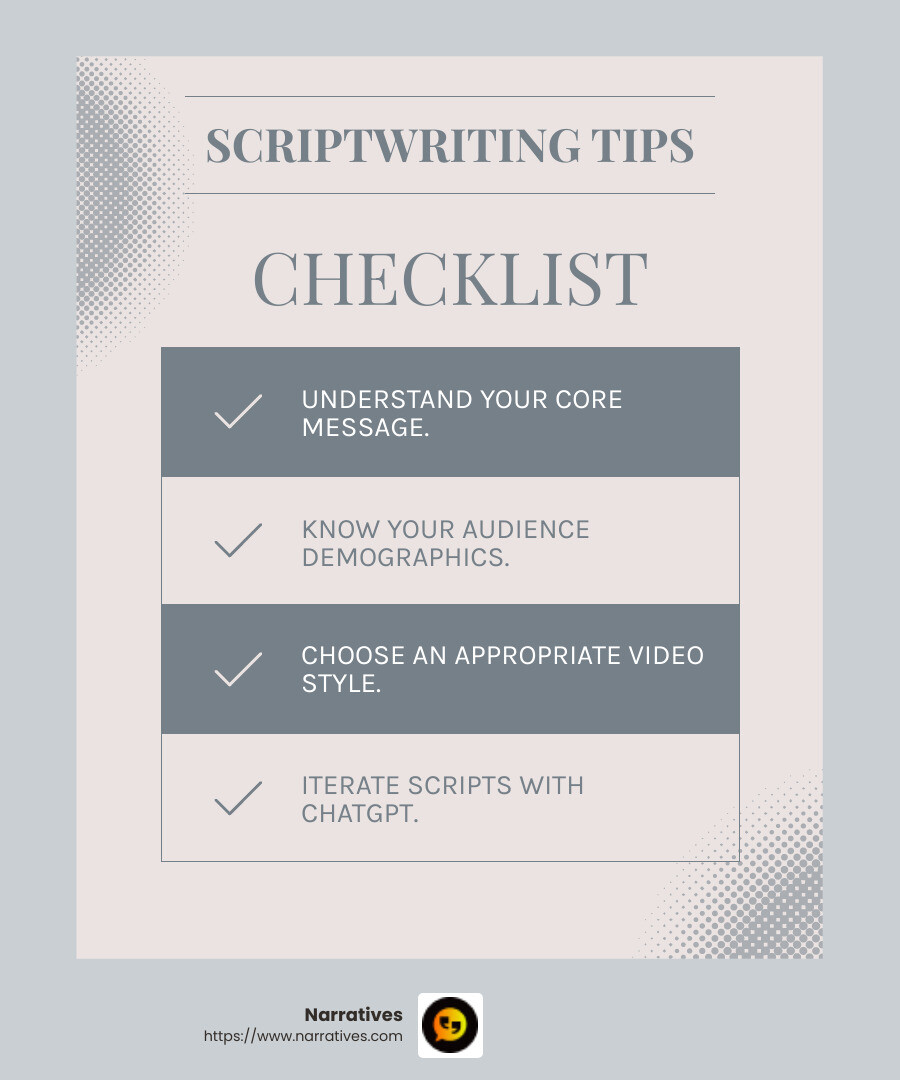
Creating a video starts with a strong foundation. This means understanding your core message. What do you want your audience to take away? Whether you're informing, entertaining, or inspiring, clarity is key.
Next, know your audience. Are they young students, busy professionals, or passionate activists? Tailor your content to their interests and preferences. This ensures your video not only reaches them but also resonates deeply.
Choosing the right video style is equally important. A tutorial might need clear, instructional visuals, while a story might benefit from a documentary approach. Aligning style with message and audience keeps viewers engaged from start to finish.
Generating the Script with ChatGPT
Once your concept is clear, it's time to move to scriptwriting. ChatGPT can be your co-writer, changing ideas into a script that flows naturally. Begin by crafting a precise prompt for ChatGPT. This sets the tone and direction.
For example, if your video is about urban gardening, you might prompt, "Create a script that educates city dwellers on starting a garden with limited space, focusing on sustainability."
After receiving the draft, engage in script refinement. Review the content, ensuring it aligns with your core message and audience needs. This might involve adding personal stories or adjusting the tone.
The process is iterative. Don't hesitate to ask ChatGPT for revisions. You might request, "Add a section on the environmental benefits of urban gardening," or "Include a call to action encouraging viewers to start their own garden."
By following these steps, you can harness the power of ChatGPT to create scripts that are not only informative but also engaging and impactful.
With your script ready, you're well on your way to creating a video that captivates and informs. Next, we'll explore Recording and Voiceover Techniques to bring your script to life.
Recording and Voiceover Techniques
With your script in hand, it's time to bring it to life with a compelling voiceover. The quality of this audio narration can significantly impact how your audience perceives your video. Let's explore how to achieve top-notch voiceover quality, use text-to-speech tools effectively, and ensure seamless audio synchronization.
Achieving Quality Voiceovers
A quality voiceover is clear, engaging, and free from distractions. Here's how to ensure your recordings hit the mark:
Invest in a Good Microphone: A quality microphone can make a huge difference. It captures your voice clearly and minimizes background noise.
Find a Quiet Space: Background noise can ruin a good voiceover. Record in a quiet room, or use soundproofing materials if needed.
Rehearse and Enunciate: Practice your script beforehand. Speak clearly and at a steady pace to keep your audience engaged.
Edit Your Audio: Use audio editing software to remove any mistakes or pauses. This ensures a smooth and professional final product.
Using Text-to-Speech Tools
For those who prefer a digital voice, text-to-speech (TTS) technology offers a viable alternative. Here's how to get the best results:
Choose the Right Software: Select a TTS service that offers natural-sounding voices, like Google Text-to-Speech or Amazon Polly.
Customize the Voice: Adjust settings such as speed and pitch to match your video's tone.
Review and Adjust: Listen to the output and make necessary changes to pronunciation or emphasis. The goal is to make the voice sound as lifelike as possible.
Ensuring Audio Synchronization
Synchronizing your voiceover with your visuals is crucial for a coherent video. Here's how to achieve perfect harmony:
Use Precision Tools: Most video editing software offers tools to align audio with video. Use these to fine-tune the timing.
Adjust Timing: It might be necessary to cut or stretch video clips to match the voiceover. This ensures that visuals and audio flow seamlessly together.
Test and Refine: Watch your video multiple times to ensure synchronization. Make adjustments as needed to create a polished final product.
By focusing on these techniques, you'll ensure that your video's audio component is as engaging and professional as its visual content. Now, let's dive into Creating and Editing Visual Content to complete your video masterpiece.
Creating and Editing Visual Content
Once your script and voiceover are ready, it's time to focus on the visual elements that will bring your story to life. This section covers visual sourcing, incorporating branding elements, and selecting the right video editing software to improve your video.
Visual Sourcing
Choosing the right visuals is key to making your video engaging and effective. Here are some tips for sourcing quality visuals:
Stock Footage and Images: Websites like Pixabay, Unsplash, and Pexels offer high-quality, royalty-free images and videos. They're great resources if you're working on a budget.
Original Graphics and Animations: Tools like Adobe After Effects or Blender can help you create custom animations and graphics. This is ideal for videos that need a unique touch.
Storyboard Your Ideas: Before diving into video assembly, sketch a storyboard or create a shot list. This helps visualize the flow and ensures each visual element reinforces your script's message.
Incorporating Branding Elements
Branding is crucial for consistency and recognition, whether you're creating a video for a business or a personal brand. Here's how to incorporate branding elements effectively:
Logos and Color Schemes: Include your logo and use your brand's color palette throughout the video. This helps maintain a cohesive look and feel.
Typography: Use fonts that are consistent with your brand's identity. Ensure text is legible and stylistically aligned with your video theme.
Consistent Style: Maintain a consistent visual style across all elements, from graphics to transitions. This reinforces your brand's identity and makes your video look professional.
Video Editing Software
Choosing the right video editing software is essential for bringing all your elements together seamlessly. Consider these options based on your needs and expertise:
Adobe Premiere Pro: Offers advanced features for professional editors. It's perfect for complex projects that require detailed editing.
Final Cut Pro: Ideal for Mac users seeking a robust editing platform with a user-friendly interface.
DaVinci Resolve: A powerful free option that provides professional-grade editing capabilities, suitable for both beginners and experienced editors.
Shotcut: Another free software that offers a range of editing tools for those new to video production.
Syncing with Your Voiceover
As you place visuals on the timeline, ensure they sync perfectly with your voiceover. Here’s how to achieve seamless synchronization:
Align Visuals with Audio Cues: Use the audio waveform in your editing software to match visuals with specific parts of the voiceover.
Natural Transitions: Ensure that transitions between visuals are smooth and support the pacing of the narration.
Test and Refine: Watch the video multiple times to ensure everything aligns perfectly. Make adjustments as needed for a polished final product.
By focusing on these aspects, you'll create a visually appealing video that complements your script and voiceover. Now, let's move on to the Frequently Asked Questions about Using ChatGPT for Video Content Creation to address common inquiries and provide further insights.
Frequently Asked Questions about Using ChatGPT for Video Content Creation
How can ChatGPT assist in video scriptwriting?
ChatGPT can be a powerful ally in video scriptwriting by providing creative ideas and structuring your narrative. It helps in crafting engaging scripts that capture your audience's attention. Here's how:
Prompt Crafting: Start by giving ChatGPT a clear and detailed prompt. For example, if you want a script about eco-friendly living, specify the tone, key points, and target audience.
Script Refinement: Use ChatGPT to refine your script. It can suggest improvements in language, tone, and structure, making your script more polished.
Iterative Process: Engage in an iterative process. Generate a draft, review it, and refine it further with ChatGPT's help. This back-and-forth can improve the quality of your script.
What are the best practices for using ChatGPT in video content creation?
To maximize the benefits of ChatGPT in video content creation, consider these best practices:
Be Specific: Provide detailed instructions in your prompts. The more specific you are, the better the output you'll receive.
Experiment with Tone: Use different tone modifiers to see which style resonates best with your audience. For example, a friendly and professional tone can be effective for educational content.
Leverage Its Strengths: ChatGPT excels in generating ideas, outlines, and drafts. Use it to brainstorm and structure your content, then refine the details yourself.
Quality Control: Always review and edit the content generated by ChatGPT. Ensure it aligns with your message and meets your quality standards.
How does ChatGPT improve the video creation process?
ChatGPT can significantly improve the video creation process by streamlining various stages:
Time Efficiency: It speeds up the scriptwriting phase, allowing you to focus more on production and editing.
Idea Generation: ChatGPT provides fresh perspectives and ideas, helping you overcome creative blocks.
Content Consistency: By using ChatGPT, you can maintain a consistent tone and style throughout your video scripts, which is crucial for brand identity.
Adaptability: Whether you need a script for a tutorial, vlog, or promotional video, ChatGPT can adapt to different formats and styles, making it a versatile tool in your content creation toolkit.
By understanding these aspects, you can harness ChatGPT's potential to create compelling video content. Next, we'll dig into the Conclusion, where we'll explore how Narratives can further improve your digital storytelling efforts.
Conclusion
In digital storytelling, Narratives stands as a guide for non-profits aiming to amplify their impact. We specialize in crafting high-quality, emotionally resonant video content that lifts underrepresented voices. By partnering with us, organizations can share their stories in a way that inspires action and builds trust.
Non-profit partnerships are at the heart of what we do. We understand the unique challenges faced by these organizations and are committed to helping them achieve their goals through powerful storytelling. Our expertise in video content creation, combined with tools like ChatGPT, ensures that your message is both compelling and clear.
Through our collaboration, we strive to create content that not only informs but also engages and motivates audiences. By leveraging AI technologies, we streamline the content creation process, making it more efficient and effective. This allows us to focus on what truly matters—telling stories that make a difference.
For those ready to take their storytelling to the next level, learn more about our services and find how we can help bring your vision to life. Together, we can create impactful narratives that resonate with your audience and drive meaningful change.
.avif)